Conducting CAPI Interviews
Launching CAPI Application
- Locate CAPI Control File using My Computer or Windows Explorer. The default Control File
 A Control File translates your design specifications into commands that the Data Entry, CAPI, ACASI, or Web module uses to administer or collect data during interviews or data entry. name is Specifications File name + En CAPI.QPI and is type QDS Personal Interview Control File.

- Double-click or tap on the Control File. If a Read password has been defined in the Design Studio, you will need to add it before conducting an interview (see Adding Passwords).
- Your CAPI application will open to the first screen of the questionnaire.
The sample screen below shows a date type question with color options selected under Build Options, Colors:
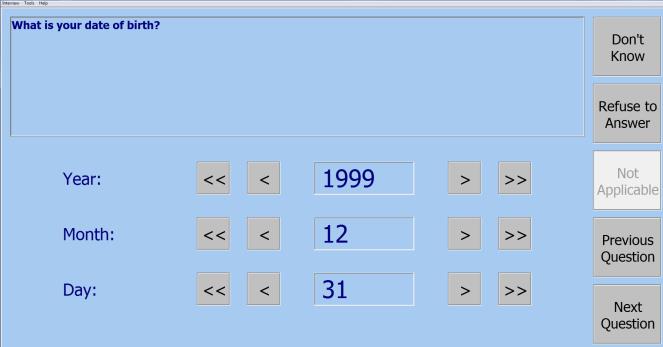
Question text appears in the box at the top and response options are in the space below. Special response buttons (Don’t Know, Refuse to Answer, and Not Applicable are located on the upper right of the screen.
Navigation buttons (Previous and Next Question) are located along the bottom right edge of the screen. To disable the Previous Question button at any point during the interview, add a Format Element, and check the Disable "Previous Question" button on next data element option box. When that option box is checked, the Previous Question button will be disabled on the next Data Element. If there are any intervening Information Elements, the Previous Question button will also be disabled on those.
Tip: See CAPI Control File Locations for tips on where to maintain your control files. You may also create a Windows shortcut for the Control File; placing a shortcut on the desktop is a good method for keeping the interview process as simple as possible.
CAPI Open Dialog Box
Alternatively, it is possible to open your interview through the Open Dialog box.
- Go to QDS 5.0|CAPI Program 5.0 from Windows Start Menu or Apps View of Start screen. This launches CAPI and displays the Open dialog box.
- If necessary, navigate to the correct folder and select the .QPI control file.
- Notice that the Begin a new interview radio button will be selected by default. The alternate option is resuming a CAPI interview.
- Select Open.
- The dialog box will close and the first screen of the questionnaire will be displayed.