Report Elements: Contents Tab
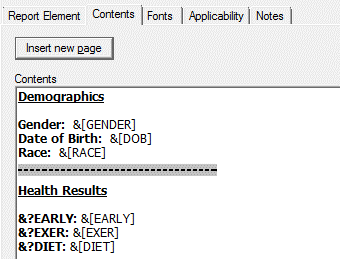
You will type in the body of your report on the Contents tab. Report content can include open text, variable response data (including automatic variables), substitutions tokens, page breaks, and formatting. See also Inserting Report Elements.
Formatting Options
- Select the Insert new page button to insert a hard page break into your report. The break will be inserted at the location of the input caret in the Contents field. In the example below, a page break is inserted before the Health Results section.
- The main menu commands Edit | (Bold, Italic, and Underline) may be used in the contents box.
- To insert a line break, enter Ctrl+Enter.
- To insert a tab, enter Ctrl+Tab.
Contents Example
To specify a report with demographic question responses on the first page and health variable question text and responses on the second page, you could enter the following in the Contents box (see also Substitution Tokens in Reports).
- Demographics
- Gender: &[GENDER]
- Date of Birth: &[DOB]
- Race: &[RACE]
Page Break
- Health Results
- &?EARLY: &[EARLY]
- &?EXER: &[EXER]
- &?DIET: &[DIET]