Conducting ACASI Interviews
Launching ACASI Application
- Locate the ACASI Control File (*.QSI) in My Computer or Windows Explorer. The default Control File
 A Control File translates your design specifications into commands that the Data Entry, CAPI, ACASI, or Web module uses to administer or collect data during interviews or data entry. name is Specifications Filename + En ACASI.QSI and is type QDS Self-Interview Control File.

- Double-click or tap on the control filename. If a Read password has been defined in the Design Studio, you will need to add it before conducting an interview (see Adding Passwords).
- Your ACASI application will open to the first screen of the questionnaire.
The sample screen below shows a pick one type question with color options selected under Build Options, Colors.
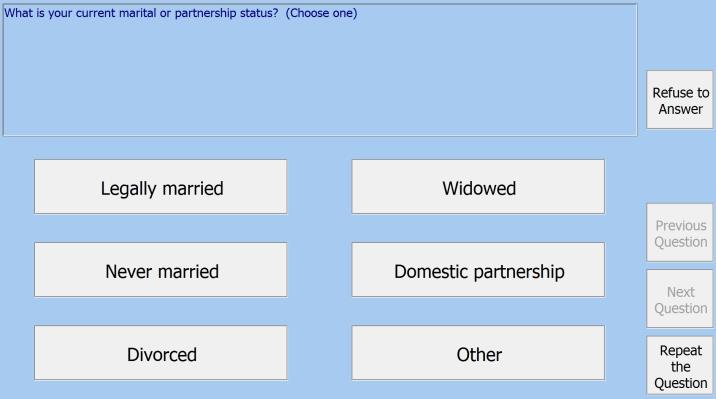
The ACASI screen is the same as the CAPI screen, however; there is no menu bar at the top and there is an additional button at the bottom right, Repeat the Question which will repeat the audio.
Special response buttons (Don’t Know, Refuse to Answer, and Not Applicable) are located on the upper right of the screen. Special codes not allowable for a question can be hidden by selecting Hide disallowed Special Response buttons and the Refuse to Answer button can be hidden unless activated by staff with the Restrict use of "Refuse to Answer" option (see Build Options, Operations).
Navigation buttons (Previous and Next Question) are located above Repeat the Question. To disable the Previous Question button at any point during the interview, add a Format Element, and check the Disable "Previous Question" button on next data element option box. When that option box is checked, the Previous Question button will be disabled on the next Data Element. If there are any intervening Information Elements, the Previous Question button will also be disabled on those.
Tip: See ACASI Control File Locations for tips on where to maintain your control files. You may also create a Windows shortcut for the ACASI Control File. Placing a shortcut on the desktop is a good method for keeping the interview process as simple as possible.
ACASI Open Dialog Box
Alternatively, it is possible to open your interview through the Open dialog box, similar to the CAPI Open dialog box.